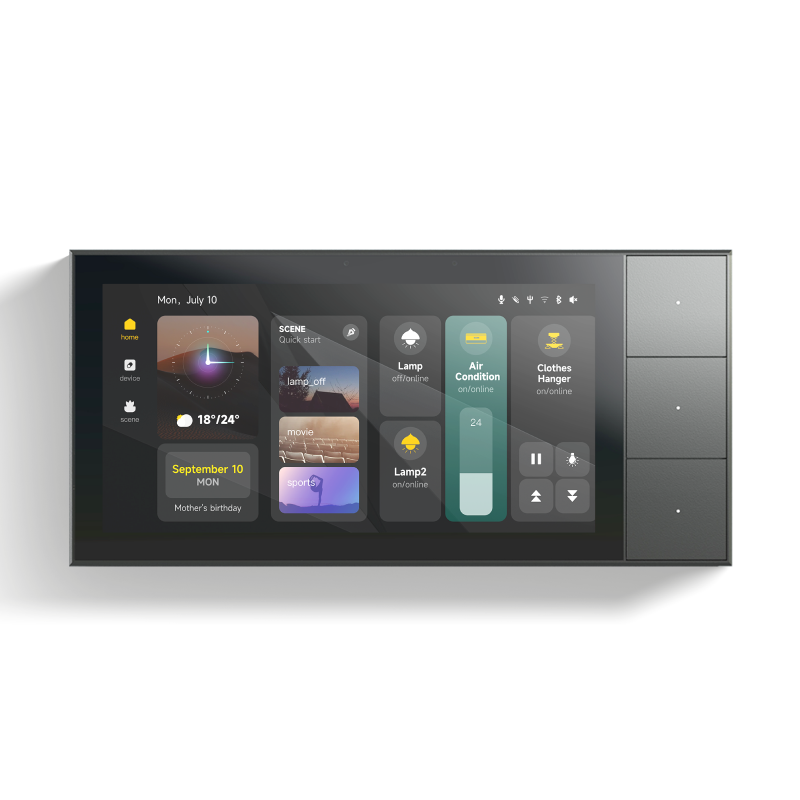
High-Res Smart Home Control Panel 6 INCH | Wall-Mount Touchscreen Console | Built-In 3-Gang Switch, ZigBee 3.0 Gateway & HD Camera Hub | Works with Alexa, Google Home & Smart Life App
15500
EGP16000
EGP3%-
smart home control panel touchscreen wall mount console central hub zigbee gateway 3 gang light switch video intercom camera monitor automation dashboard tuya
Watching this product Now 20 Client
Brief Description
Eliminate wall clutter and take absolute command of your living space with the High-Res Smart Home Control Panel. This premium, flush-mount wall console replaces traditional switches with a brilliant, high-definition interactive touchscreen. Functioning simultaneously as a 3-Gang physical light switch, a powerful ZigBee 3.0 mesh gateway, and an integrated HD camera hub, it brings your entire ecosystem together. View live security feeds, trigger complex smart scenes, play music, and manage hundreds of smart devices from a single, stunning focal point.
Product Features
- The Ultimate All-in-One Command Center: Consolidates your light switches, ZigBee hub, intercom, and smart scene triggers into a single elegant wall panel.
- Built-in 3-Channel Power Relay: Directly wire up to 3 separate lighting zones or appliances to the panel, retaining localized physical control.
- Integrated ZigBee 3.0 Gateway: Acts as a heavy-duty local hardware hub, allowing you to connect and automate over 100+ ZigBee sensors, switches, and curtain modules without buying an external gateway.
- HD Camera & Intercom Hub: Stream real-time video from your outdoor smart doorbells or security cameras directly on the wall display. Supports two-way audio communication.
- Customizable Smart Scenes: Create one-touch dashboard shortcuts like "Movie Night" (dims lights, closes curtains) or "Away Mode" (arms security cameras and shuts off appliances).
Product Technical Specifications
FeatureSpecificationDisplay4-Inch / 5-Inch High-Resolution Multi-Touch IPS ScreenOperating SystemAndroid-based Smart Home OSWireless ProtocolsWiFi 2.4GHz, ZigBee 3.0, Bluetooth MeshOn-Board Relays3-Gang (3-Channel Output)Max Load per Gang200W/Gang (LED/Resistive)Input Voltage100V - 240V AC (50/60Hz)Integrated CameraHD Wide-Angle Camera with Privacy ShutterWiring RequirementsLive + Neutral Wire RequiredDimensionsStandard 86mm x 86mm Square Wall Box Compatible
Simple Installation Instructions
⚠️ IMPORTANT SAFETY NOTE: This installation requires handling high-voltage wiring. Ensure your main circuit breaker is completely switched OFF before starting.
1.Remove & Verify:Prepare Wall Box.Remove your existing wall switch. Ensure a Neutral wire (N), Live wire (L), and up to three Load wires (L1, L2, L3) are available inside the wall junction box.
2.Wire the Terminal:Secure Connections.Connect the main Live power to L and Neutral to N. Connect your light fixture lines to L1, L2, and L3. Double-check that all terminal screws are tightly clamped down to prevent arcing.
3.Fix to Wall:Mount the Frame.Gently push the wiring back into the junction box. Secure the panel's mounting bracket to the wall box using the provided screws, then snap the high-res screen display firmly into place on the base module.
4.Boot & Pair:Network Sync.Restore the main power. The panel will boot up automatically. Follow the on-screen configuration wizard to connect it to your home WiFi network, and link it instantly to your Smart Life / Tuya master account.
Frequently Asked Questions
Q: Can this display replace a standard 2-gang or 3-gang light switch box?
A: Yes. It is physically designed to fit into standard 86mm x 86mm square wall boxes and directly handles up to 3 hardwired lighting channels while replacing those older manual switches.
Q: Does it work with my existing ZigBee sub-devices?
A: Absolutely. Because it features an onboard ZigBee 3.0 standard gateway, you can pair your existing ZigBee motion sensors, door sensors, and radiator valves directly to this panel.
Q: Can I view my CCTV security cameras on this screen?
A: Yes. Any smart camera or video doorbell integrated into your Tuya/Smart Life ecosystem can be pulled up as a live video stream directly on the panel dashboard.