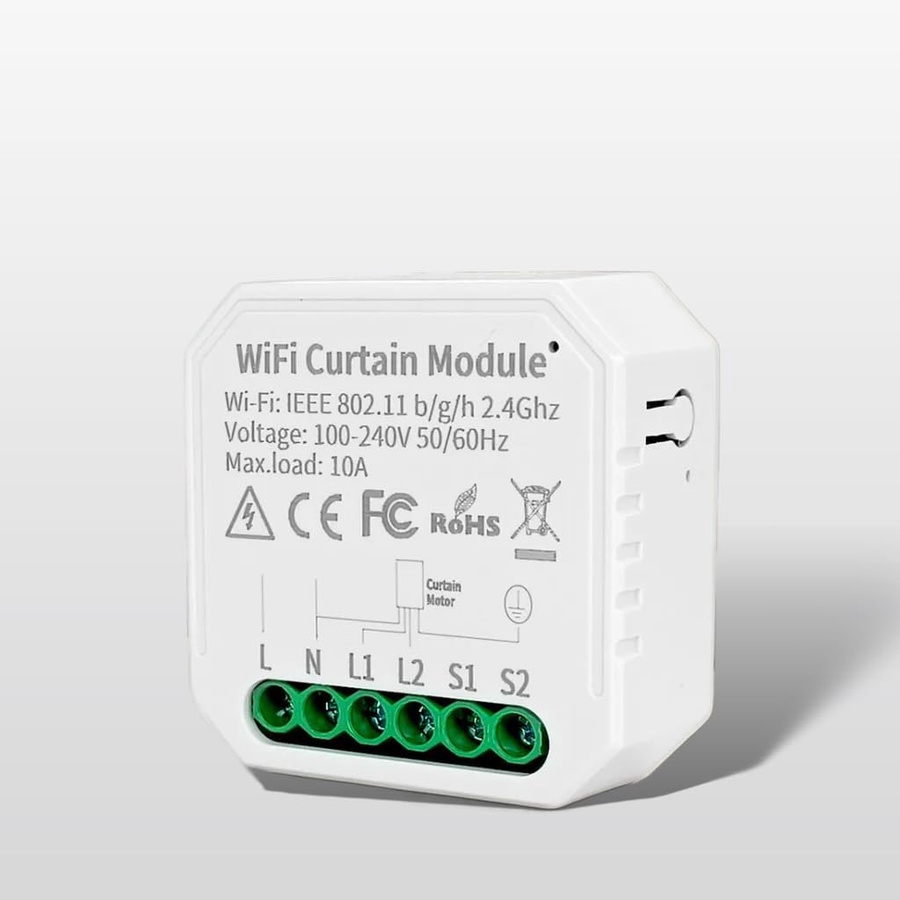
WiFi Mini Smart Curtain Switch Module 1-Channel | Roller Shutter & Blinds Automation Controller | Works with Alexa & Google Home | Smart Life App Remote, Timer Schedules & Calibration Support | No Hub Required
750
EGP800
EGP6%-
wifi smart curtain module roller shutter switch inline remote controller motorized blinds shades automatic window opener smart life app tuya alexa
Watching this product Now 20 Client
Brief Description
Transform your traditional motorized curtains, roller shutters, or window blinds into an automated smart system without replacing your existing setup. This ultra-compact 1-Channel WiFi Curtain Module hides completely inside your wall box or ceiling cavity. Connecting directly to your home WiFi without needing an expensive hub, it gives you the luxury of smartphone control, automated scheduling, and hands-free voice commands.
Product Features
- Invisible In-Wall Installation: The ultra-slim mini design slips discreetly behind your existing traditional curtain switch inside the wall junction box.
- Direct WiFi Connectivity: Operates on standard 2.4GHz WiFi networks. Completely standalone—no hub or gateway required.
- Precise Position Calibration: Use the smartphone app to calibrate the module to your specific motor, allowing you to open or close your blinds to an exact percentage (e.g., 30% open).
- Voice & App Remote Control: Effortlessly command your shades via Amazon Alexa, Google Assistant, or the Smart Life / Tuya mobile app from anywhere in the world.
- Smart Routines & Timers: Schedule your curtains to automatically open at sunrise to wake up naturally, or close at sunset for instant privacy.
- Maintains Manual Control: Intelligently wires into your existing physical toggle or rocker switches so your family can still operate them normally.
Product Technical Specifications
FeatureSpecificationWireless ProtocolWiFi 2.4 GHz (802.11 b/g/n)Input Voltage100V - 240V AC (50/60Hz)Max Current / Load3A (Resistive / Motor Load)Channel Count1-Channel (Controls 1 Motor Line)App SupportSmart Life / Tuya SmartCasing MaterialFlame Retardant PC V0Dimensions39.2mm x 39.2mm x 18mm
Simple Installation Instructions
1.Cut the Power:Safety First.Turn off the main electrical circuit breaker before starting. Verify with a voltage tester that the lines are completely dead.
2.Connect the Terminals:Wiring Connections.Connect your main electrical supply to the L (Live) and N (Neutral) terminals. Connect your curtain motor's directional wires to the L1 (Open) and L2 (Close) output lines. Hook up your physical wall switch to the corresponding S1 and S2 switch ports.
3.Connect to App:Smart Pairing.Turn the main breaker back on. Ensure your smartphone is connected to a 2.4GHz WiFi network. Open the Smart Life/Tuya app, hold down the reset button on the module until it starts blinking, and follow the on-screen prompts to add the device.
4.Run Motor Calibration:Accurate Tracking.Navigate to the switch settings in the app and select "Calibration." Let the motor run through its full open and close cycles so the app can precisely learn its limits.
Frequently Asked Questions
Q: Do I need a special bridge or gateway hub for this to work?
A: No. This is a standalone WiFi module. It connects directly to your home's 2.4GHz WiFi router without any additional hardware.
Q: Can I still use my physical wall switch button?
A: Yes! The module acts as an inline smart overlay, meaning your physical wall switch buttons work exactly the same way they always have, while adding smart app features.
Q: Does this module support percentage control?
- A: Yes. Once you run the initial calibration process in the app, you can tell Alexa or use the app slider to set the curtains to precise levels, like "half open."